
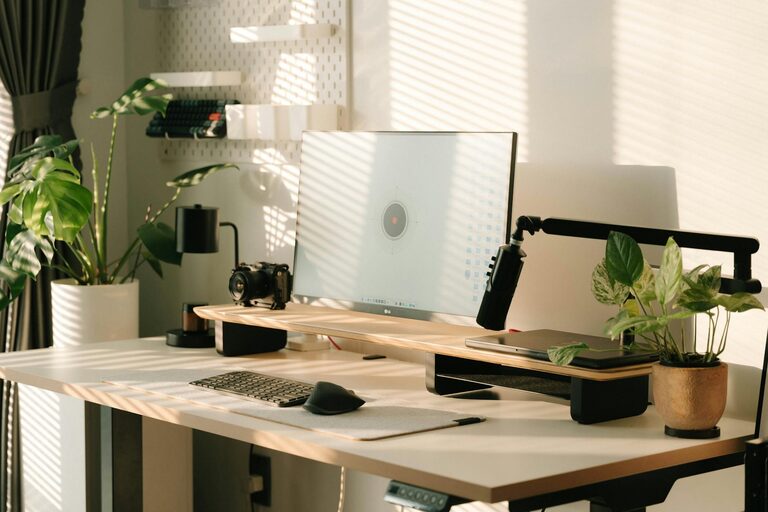
Creating a comfortable and productive home office space is essential for anyone working remotely or spending significant time on projects at home. A well-designed workspace can improve focus, reduce stress, and enhance overall job satisfaction. Whether you have a dedicated room or a small corner, these tips will help you set up an environment that supports your best work.
Choose the Right Location
Find a Quiet Spot
Select a part of your home that is quiet and experiences minimal foot traffic. This helps reduce distractions and allows you to concentrate better. Ideally, use a separate room to clearly define work and personal life boundaries.
Consider Natural Light
Natural light positively impacts mood and energy. Position your desk near a window if possible. If natural light is limited, invest in full-spectrum light bulbs that mimic daylight.
Invest in Ergonomic Furniture
Comfortable Chair
A supportive, adjustable chair is vital to prevent back and neck pain. Look for chairs with lumbar support, adjustable height, and armrests.
Desk Height and Size
Choose a desk that fits your space and allows enough room for your computer, paperwork, and other essentials. The ideal desk height keeps your forearms parallel to the floor when typing.
Organize Your Workspace
Declutter Daily
Keeping your workspace tidy minimizes distractions. Spend a few minutes each day putting things back in place.
Use Storage Solutions
Storage boxes, shelves, and file organizers help keep supplies and documents neatly arranged. Label containers for easy access.
Cable Management
Use clips, sleeves, or ties to organize wires and prevent clutter. A neat workspace looks professional and reduces stress.
Personalize Your Space
Add Plants
Plants improve air quality and add a touch of nature. Choose low-maintenance options like succulents or spider plants.
Decorate Thoughtfully
Include items that inspire you, like artwork or motivational quotes, but avoid overcrowding your desk. The right balance keeps your space inviting yet functional.
Optimize Technology and Tools
Reliable Internet Connection
A fast and stable internet connection is critical for communication and research. Consider upgrading your router if you experience frequent disruptions.
Quality Equipment
Invest in a good monitor, keyboard, mouse, and headset to enhance comfort and efficiency. Ergonomic devices reduce strain during extended use.
Backup Solutions
Use cloud storage or external drives to back up important files regularly, ensuring your work is safe.
Manage Noise and Interruptions
Use Noise-Canceling Headphones
If your environment is noisy, noise-canceling headphones can help you focus and reduce distractions.
Set Boundaries
Communicate your work hours to family members or roommates. Use visual cues, like a closed door or a dedicated sign, to signal when you shouldn’t be disturbed.
Maintain Good Posture and Take Breaks
Sit Tall and Adjust Often
Keep your feet flat on the floor and your back straight. Change positions periodically to prevent stiffness.
Follow the 20-20-20 Rule
Every 20 minutes, look at something 20 feet away for 20 seconds. This helps reduce eye strain caused by prolonged screen time.
Take Regular Breaks
Stand up, stretch, or take a short walk every hour. Breaks improve circulation and boost mental clarity.
Use Efficient Lighting
Task Lighting
A desk lamp focused on your work area reduces eye fatigue and improves visibility for detailed tasks.
Adjustable Lighting
Use dimmers or adjustable lamps to control the brightness according to the time of day and your activities.
Keep Air Quality and Temperature Comfortable
Ventilation
Ensure your workspace is well-ventilated. Open windows when possible or use air purifiers to maintain fresh air.
Temperature Control
Maintain a comfortable temperature, ideally between 68–72°F (20–22°C). Use fans or heaters as necessary to stay comfortable without distractions.
Plan Your Daily Workflow
Schedule Tasks
Create a to-do list or use digital planners to organize your day. Prioritize high-focus tasks during your peak productivity hours.
Minimize Multitasking
Focus on one task at a time to improve efficiency and reduce mistakes.
—
By implementing these practical tips, you can transform your home office into a space that promotes comfort and productivity. A thoughtfully designed workspace not only helps you get work done but also contributes to your well-being while working from home.